
RTMNU Results: Rashtrasant Tukadoji Maharaja Nagpur University releases the RTMNU Summer / Winter exam result online at the official website, rtmnresults.org. Students can check the Nagpur University result through the link provided on this page. The “Roll No” is required to check the RTM Nagpur University exam result.
Whether you're a student eagerly awaiting your semester results or an academic professional seeking detailed information, this page provides timely and accurate results for all RTMNU examinations. Stay informed about your academic progress with our user-friendly platform, designed to offer quick access to your results, important notifications, and other relevant information. Explore the latest updates and ensure you never miss any crucial announcements regarding your academic journey at RTMNU.
Quick Links:
- Download Brochure
- Exam Time Tables
- Question Papers
- Exam Results
- Syllabus
RTMNU Results
Nagpur University releases the semester exam result online. The University conducts the exam twice a year, Summer and Winter Session. The Summer Session exam is conducted in the month of Feb/March and the Winter Session exam in Nov/Dec.
The link to check RTMNU Result is mentioned below.
[indcareerresults id="384" name="Rashtrasant Tukadoji Maharaja Nagpur University (RTMNU)"]RTMNU Result: How to Check?
RTMNU Result is available online at the official website. Students can check the result in a few simple steps. Follow the steps mentioned below and check the result.
Step 1: Visit the official website of Rashtrasant Tukadoji Maharaj Nagpur University (RTMNU) at nagpuruniversity.ac.in
Step 2: Look for the "Examination" or "Results" section on the homepage and click on it. Select your course (e.g., BA, B.Com, B.Sc, MA, M.Com, etc.) and the specific exam you appeared
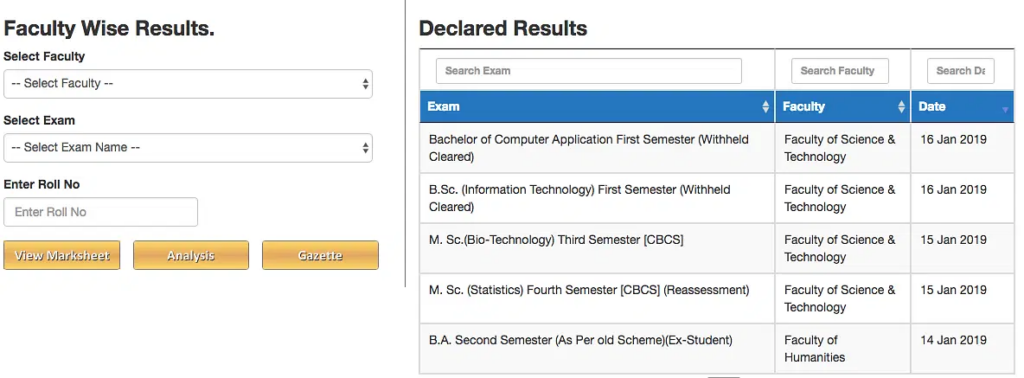
Step 3 – Now, the candidates are directed to the next page where the candidates can check their mark sheet by selecting the required details such as Faculty, Exam and entering the Roll Number.
Step 4 - Now you will see a new dialogue box pop-up, Click on “View Marksheet”
Step 5 – After selecting the details, the candidates can check their marks obtained in the various subjects of the examination.
Step 6 – Lastly, the candidates need to save it and take a printout of the mark sheet for future reference. You can also download and save your results for future reference.
If you face any issues or cannot find your result, contact the RTMNU examination department for assistance
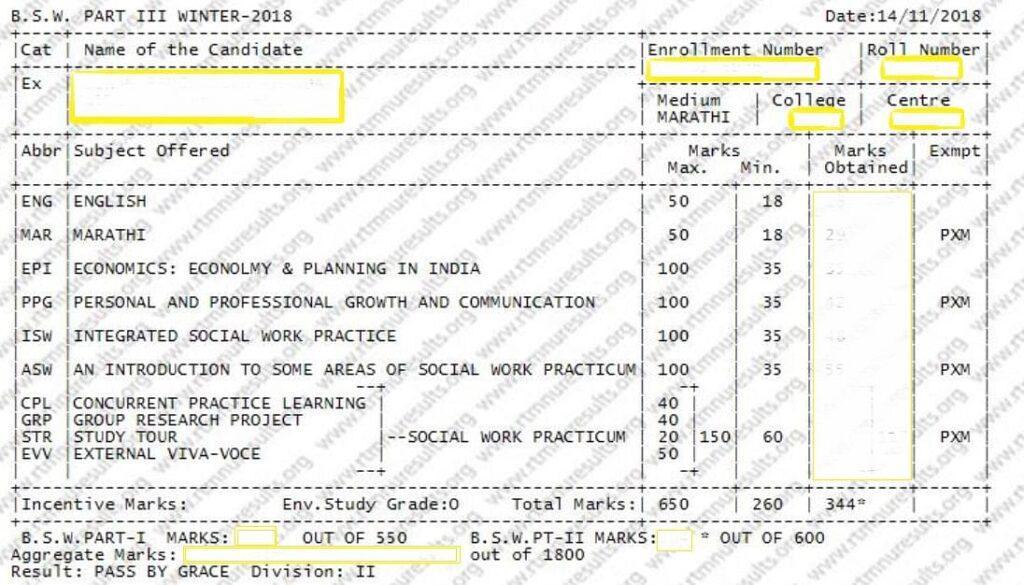
Printed Details on RTMNU Result
Check the list of details mentioned on the RTMNU Result.
- Course Name and Semester
- Enrollment Number
- University Roll Number
- Name and Category of Students
- Medium of language
- College and Center name
- Examination Name
- Date
- Cat
- Abbr
- Marks Max. & Min
- Marks Obtained
- Exempt
- Incentive Marks
- Total Marks
- Aggregate marks
- Result and Division
For better understanding and verification of the details displayed in the result, we have listed below all the details present in the marksheet.
RTMNU Result Revaluation Process
Any student who is not satisfied with his result can apply for revaluation. The university will notify the dates and students have to fill the form and submit the form along with the fees in given time. If anyone fails to do so will not be able to revaluate his/her paper.
After the revaluation, the results will be declared by the university on the official website. Students willing to check result can download their results from the above links.
How do I apply for a duplicate marksheet from RTMNU?
To apply for a duplicate marksheet from Rashtrasant Tukadoji Maharaj Nagpur University (RTMNU), follow these steps:
- Visit the RTMNU online portal at rtmnuresults.org and create a user account if you haven't already.
- Log in to your account and navigate to the "Examination" or "Results" section.
- Look for the option to apply for a "Duplicate Marksheet" and click on it.
- Fill out the online application form completely, providing details like your name, roll number, exam details, reason for requesting a duplicate, etc.
- Attach scanned copies of the required documents, which may include:
- Police FIR or Non-Cognizance Certificate
- Aadhar Card
- Annexure A (Self Declaration)
- Annexure B (Self Declaration for Self Attestation)
- Copy of original marksheet or passing certificate
- Pay the applicable fees online through the provided payment options.
- After submitting the application, you will receive a reference number or slip. Keep this for future reference and tracking.
- You can check the status of your application in the "Track your Application" section on the portal using the reference number.
- Once the university processes your request, you can collect the duplicate marksheet from the RTMNU examination department or have it delivered to your address.
The entire process can also be done by submitting a physical application form along with the required documents and fees at the RTMNU examination department office. The processing time is around 15 days
About RTMNU Examination
Rashtrasant Tukadoji Maharaj Nagpur University conducts the exam in the semester mode. The semester exam is conducted twice a year at the end of each semester ie, the Winter and Summer exams. The University allows the students to appear for the exam if they put the minimum required attendance in a semester. The eligible students have to submit the exam form and fees within the date mentioned by the university.
The exam schedules/programme are uploaded online a month before the commencement of the exam. The University provides the admit card to the eligible students who have registered for the exam. The appearing students have to follow the instruction mentioned by the university regarding the exam.
FAQs
RTMNU results are updated on the official website of the university.
Soon after the results are out, students can apply for revaluation. The notifications for revaluation are usually updated on the University’s official website.
The results of revaluation are usually released by the university on its official website.
Results of even semesters are usually released during the end of July.
You need to select ‘Faculty’, ‘Exam’, and then enter your ‘Roll Number’ in order to check the RTMNU results.
You can download the mark sheet by visiting the official website of RTMNU, selecting faculty, and entering your roll number.
Important Links: