
Class 11: Information Technology Chapter 3 solutions. Complete Class 11 Information Technology Chapter 3 Notes.
Maharashtra Board Solutions Class 11-Information Technology: Chapter 3- Impressive Web Designing
Maharashtra Board 11th Information Technology Chapter 3, Class 11 Information Technology Chapter 3 solutions
1. Answer the Following:
Question 1.
The data entry operator wants to insert.
1. Photograph
2. Write remarks about the photograph
3. Underline the heading.
He will use:
1. <Image>
2. <Text>
3. <TextArea>
4. <Img>
5. <UL>
6. <U>
Select the correct tags from the above and arrange them in the sequence.
Answer:
1. Photograph – <Img>
2. Write remarks about the photograph – <TextArea>
3. Underline the heading – <U>
Question 2.
Identify the logical operators in JavaScript.
1. OR
2. AND
3. ||
4. &
5. &&
6. ++
Answer:
| |, &&
2. Complete the following Activity:
Question 1.
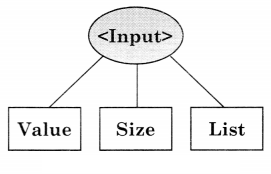
State at least three attributes of <Input>
Answer:
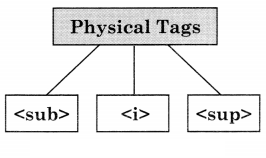
Question 2.
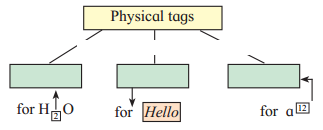
Answer:
Question 3.
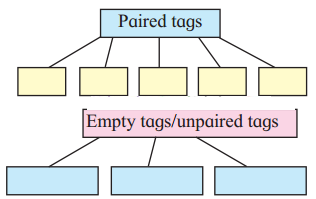
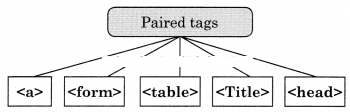
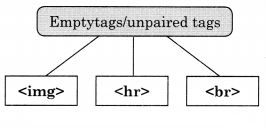
Group the Following.
Answer:
Question 4.
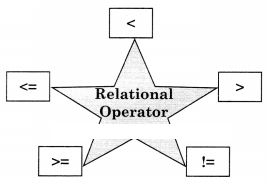
Write operator names with symbols in boxes.

Answer:
Question 5.
Complete following program to display multiplication of 6.40 and 300.
<!DOCTYPE html>
<html>
<head><title> Series </title></head>
<body>
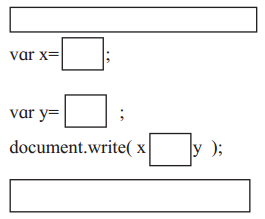
</html>
Answer:
<!DOCTYPE html>
<html>
<head><title> Series </title></head>
<body>
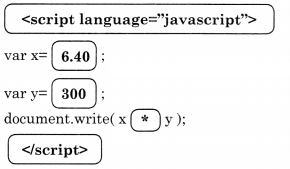
</html>
3. Find out errors if any in the following javascript code.
Question 1.
var length, breadth;
length=4.5;
breadth=6;
area=1/2*length*breadth;
document.write(“Area of triangle is”area);
Answer:
Concatenate Operator ‘+’ is missing
document. write(“Area of triangle is” [+] area);
4. Solve the following puzzles.
Question A.
Fill the blocks
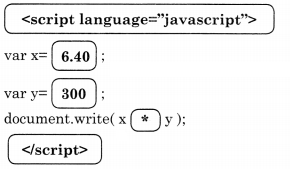
1) Across
2. The tag is used to create a table row.
4. Tag to create a form
2) Down
1. The attribute is used to specify the path of a linked document.
3. The tag used to display horizontal ruled line
Answer:
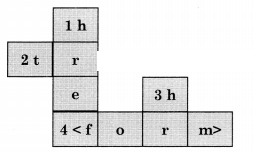
Across
2. <tr>
4. <form>
Down
1. href
3. <hr>
Question B.
Solve the puzzle by finding words with the help of the hint given below.
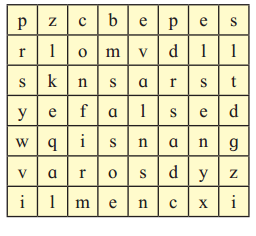
1. Boolean value.
2. Keyword used in conditional if statement.
3. Built-In function in JavaScript
4. Function to check given value is number or not
5. Keyword used to declare a variable
6. Function used to evaluate given expression
Answer:
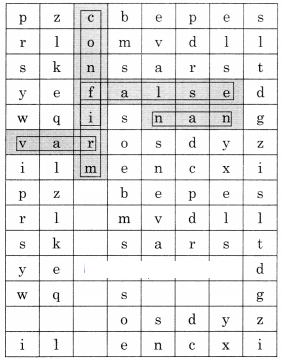
1. False
2. if
3. confirm
4. nan
5. var
6. False
5. Trace the output of the following Html code.
Question 1.
<!DOCTYPE html>
<html>
<head>
<title>Heading tags</title></head>
<body>
<h1 align=left>Information Technology</h1>
<hr>
<h2 align=center>XI Standard</h2>
<h3 align=right>Division</h3>
</body>
</html>
Answer:

6. Discuss the following and answer the questions.
Question 1.
A Jr. web designer wants to design a webpage to enter the employee’s name, address. He needs a button to clear the form content and submit the data.
Write the different controls he will use to create the web page.
State the tags to be used for the controls.
Answer:
A Junior Web designer will use the following controls to design web as follows:
1. Text – to create a single-line textbox for employee name
2. Text or Textarea – If he wants to create a single-line address the text control is used otherwise to create a multiline address textarea is used.
3. Submit – It is used to submit form data to the server.
4. Reset – It is used to clear form data.
Tags used for the controls are-
1. Employee Name :<Input type-”text”>
2. Address :<Input type=”text”> or
Address: <textarea rows=”4” cols-”30”><textarea>
3. <Input type=”submit” value=”submit”>
4. <Input type-”reset” value=”reset”>
Question 2.
A teacher has asked a student to create a web page to accept numbers and check whether it is between 50 to 100.
List the variable, operators to be used.
Specify the built-in function used and structure used.
Answer:
Program:
<!DOCTYPE html>
<head>
</head>
<body>
<script language =”Javascript”>
//To check whether the given no is between 50 to 100
var n;
n=prompt(“Enter any number”);
if(n<50 | | n>100)
{
alert(“it is less than 50, Please Re-Enter”);
}
else
{
alert(“it is greater than 50. Please Re-Enter”);
}
</script>
</body>
</html>
Variables used ‘n’
Operators used Not is equals | | less then < grater then > etc
Function is Prompt(), Alert() if then Else
7. Create web pages for the following.
Question 1.
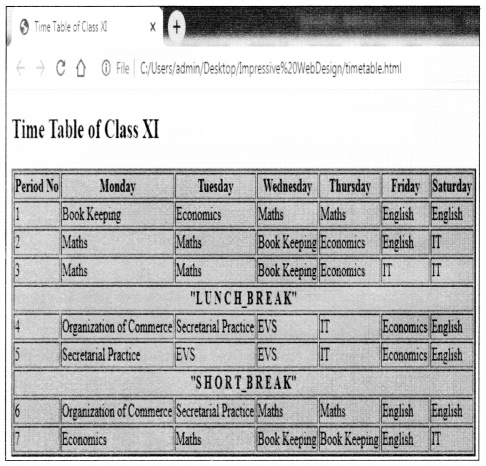
Write a program using HTML to design your class Time Table.
Answer:
Program <!Doctype Html>
<html>
<head><title> Time Table of Class XI</title>
</head>
<body bgcolor=yellow>
<h2>Time Table of Class XI</h2>
<table border=”2” bgcolor=skyblue>
<tr>
<th>Period No</th>
<th>Monday</th>
<th>Tuesday</th>
<th>Wednesday</th>
<th>Thursday</th>
<th>Friday</th>
<th>Saturday</th>
</tr>
<tr>
<td>1</td>
<td>Book Keeping</td>
<td>Economics</td>
<td>Maths</td>
<td>Maths</td>
<td>English</td>
<td>English</td>
</tr>
<tr>
<td>2</td>
<td>Maths</td>
<td>Maths</td>
<td>Book Keeping</td>
<td>Economics</td>
<td>English</td>
<td>IT</td>
</tr>
<tr>
<td>3</td>
<td>Maths</td>
<td>Maths</td>
<td>Book Keeping</td>
<td>Economics</td>
<td>IT</td>
<td>IT</td>
</tr>
<tr>
<th colspan=”7”>”L U N C H_B R E A K”</th>
</tr>
<tr>
<td>4</td>
<td>Organization of Commerce</td>
<td>Secretarial Practice</td>
<td>EVS</td>
<td>IT</td>
<td>Economics</td>
<td>English</td>
</tr>
<tr>
<td>5</td>
<td>Secretarial Practice</td>
<td>EVS</td>
<td>EVS</td>
<td>IT</td>
<td>Economics</td>
<td>English</td>
<tr>
<th colspan=”7”>”S H O R T_B R E A K”</th>
</tr>
<tr>
<td>6</td>
<td>Organization of Commerce</td>
<td>Secretarial Practice</td>
<td>Maths</td>
<td>Maths</td>
<td>English</td>
<td>English</td>
</tr>
<tr>
<td>7</td>
<td>Economics</td>
<td>Maths</td>
<td>Book Keeping</td>
<td>Book Keeping</td>
<td>English</td>
<td>IT</td>
</tr>
</table>
</body>
</html>
Question 2.
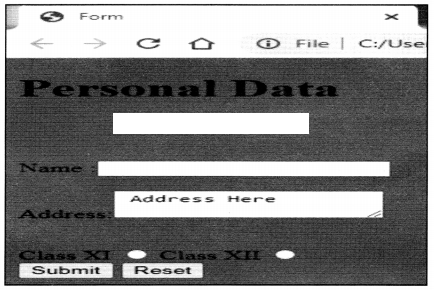
Write a program using HTML to create a form and submit it with personal data like name, address, and standard.
Answer:
Program:
<!DOCTYPE html>
<head>
<title> Form</title>
</head>
<body bgcolor=”#FF0100”>
<h1>Personal Data</h1><br><br><br>
Name :<input type=text name=t1><br><br>
Address:<Textarea> Address Here </textarea><p><br>
Class XI <input type=radio name=c1 value=xi>
Class XII <input type=radio name=c1 value=xii><br>
<input type=Submit name=b1 value=Submit>
<input type=reset name=b2 value=Reset>
</body>
</html>
Output:
Question 3.
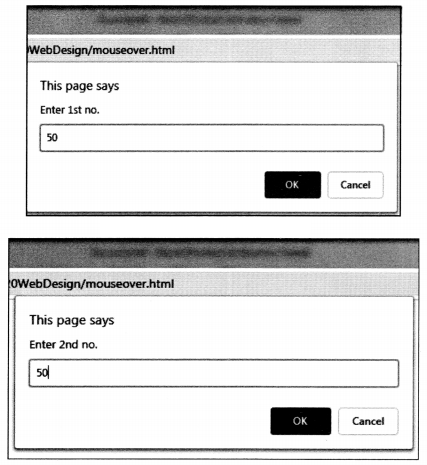
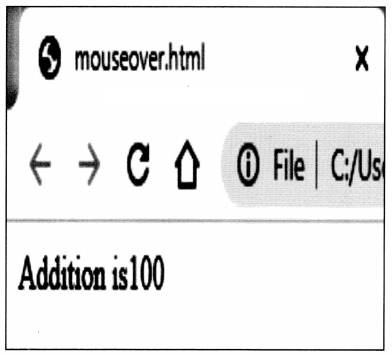
Write a javascript program to accept two numbers and perform the addition of two numbers by using the mouseover event.
Answer:
<html>
<head>
<title> JavaScript Program </title>
<script language = “JavaScript”>
function iload()
{
var c=0
a=parseInt(prompt(“Enter 1st no.”));
b=parseInt(prompt(“Enter 2nd no.”));
c=a+b
document.write(“Addition is”+c);
}
</script>
</head>
<body><center><br><br><br><br><br>
<a onMouseover=”iload();”>Addition</a></center>
</body>
</html>
8. Complete the following.
Question 1.
Answer:
9. Write HTML Code for the following table.
Question 1.
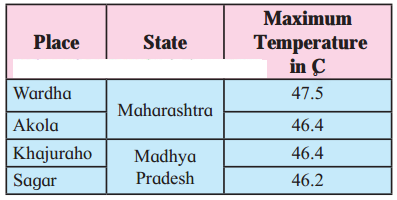
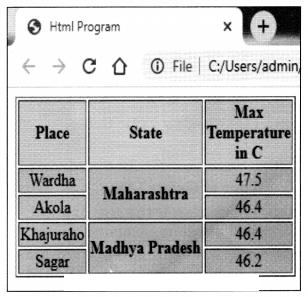
Answer:
<!DOCTYPE html>
<head>
<title>Html Program </title>
</head>
<BODY>
<table border=”1”>
<tr bgcolor=pink>
<th>Place</th>
<th>State</td>
<th>Max <br>Temperature <br>in C</th>
</tr>
<tr align=center bgcolor=skyblue>
<td>Wardha</td>
<th rowspan=”2”>Maharashtra</th>
<td>47.5</td>
</tr>
<tr align=center bgcolor=skyblue>
<td>Akola</td><td>46.4</td>
</tr>
<tr align=center bgcolor=skyblue>
<td>Khajuraho</td>
<th rowspan=”2”>Madhya Pradesh</th>
<td>46.4</td>
</tr>
<tr align=center bgcolor=skyblue>
<td>Sagar</td><td>46.2</td>
</tr>
</table>
</body>
</html>
10. Multiple choice one correct answer.
Question 1.
The default method of submitting form data is __________
(a) Post
(b) Get
(c) Submit
(d) Reset
Answer:
(b) Get
Question 2.
In JavaScript the post increment operator is __________
(a) x++
(b) x–
(c) –x
(d) ++x
Answer:
(a) x++
Download PDF
Maharashtra Board Solutions Class 11-Information Technology: Chapter 3- Impressive Web Designing
Chapterwise Maharashtra Board Solutions Class 11 Information Technology :
- Chapter 1- Basics of Information Technology
- Chapter 2- Introduction to DBMS
- Chapter 3- Impressive Web Designing
- Chapter 4- Cyber Law